
Number 1:  Sellovate
The all-in-one AI platform for Etsy digital sellers
- AI app builders
- DR 1 no change since last check
AI app builders
Turn any content into a clear, traceable mind map
Ahrefs Domain Rating benchmarked 25 Oct 2026, rebuilt 25 Oct 2026.
| Metric | Value |
|---|---|
| Domain Rating | 3 no change since last check |
| Trust Flow | 3 no change since last check |
| Citation Flow | 24 no change since last check |
| Referring domains | 17 no change since last check |
| External backlinks | 154 no change since last check |
Ahrefs Domain Rating benchmarked 25 Oct 2026, rebuilt 25 Oct 2026. Main build topic: Computers/Software/Operating Systems (3). Majestic benchmarked 25 Oct 2026, rebuilt 25 Oct 2026. Link data built by Majestic. Trust Flow, Citation Flow and Topical Trust Flow are trademarks of Majestic-12 Ltd.
| Domain age | 2 months |
|---|---|
| Registered | |
| Expires | |
| Registrar | NameSilo, LLC |
| DNSSEC | Not signed |
Convert PDFs, Word documents, ebooks, PowerPoint files, text and web pages into editable, source-traceable mind maps with AI-powered hierarchy extraction.
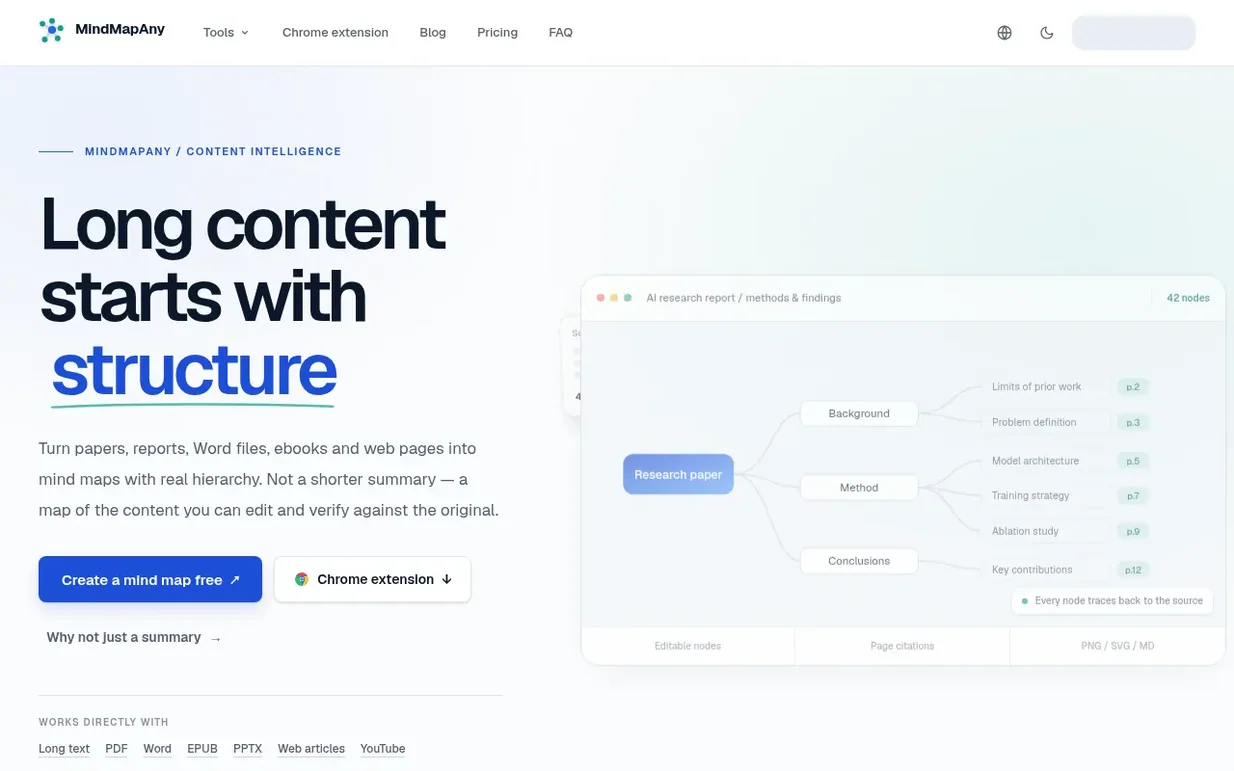
MindMapAny converts long-form content into structured mind maps. Upload a PDF, Word document, EPUB ebook, PowerPoint presentation, paste text, or provide a web link. The service extracts the body text, anchors each piece to its source location, and builds a hierarchical mind map that preserves traceability: PDF nodes carry page numbers, PPTX nodes show slide positions, and document sections are anchored to their position.
Every node in the generated map is editable. You can double-click to rename nodes, use Tab to add child nodes, Enter to add siblings, Space to collapse branches, and Delete to remove nodes. The layout, colour theme, typography and branch numbering are all adjustable. Maps export to PNG, SVG or Markdown, and you can generate public links so others can view your maps without signing up.
The platform supports 30+ output languages, so you can read content in one language and generate the map in another. Maps are limited to 110 nodes maximum per generation, with different depth settings mapping to different level and node budgets.
Pricing model: Freemium
Free plan: 30 credits on signup. Basic: $5.39/month or $64.68/year (1,000 credits/month). Pro: $10.79/month or $129.48/year (2,000 credits/month). Unlimited: $16.19/month or $194.28/year (unlimited credits).
Nobody has put MindMapAny on the bench yet. Leave the first review.
Reviewing is free, and nobody can pay for a review. Read the bench notes
Maker reviews · Workshop notes · Show it off · Did you make this? Claim it · Report this build
MindMapAny has a free listing. The owner can unlock the full profile with a paid launch for $5:
SellovateThe all-in-one AI platform for Etsy digital sellers
 Lyrio
LyrioAI workspace where research branches freely and context persists across sessions
 AI4Chat
The only AI app you'll ever need
AI-powered platform that transforms user prompts into fully customized, interactive digital experiences in real-time
Mind if we set one analytics cookie, to see which builds get read? It stays off unless you say yes. Privacy